Electrifyingan office begins with choosing the right solution for accessing power outlets. You must adapt your installation to the volume of equipment, your budget, and the frequency of use.
We present five concrete approaches to adding electrical and USB connections to your workstation, as well as methods for efficiently managing the accompanying cables.
Why electrify your office?
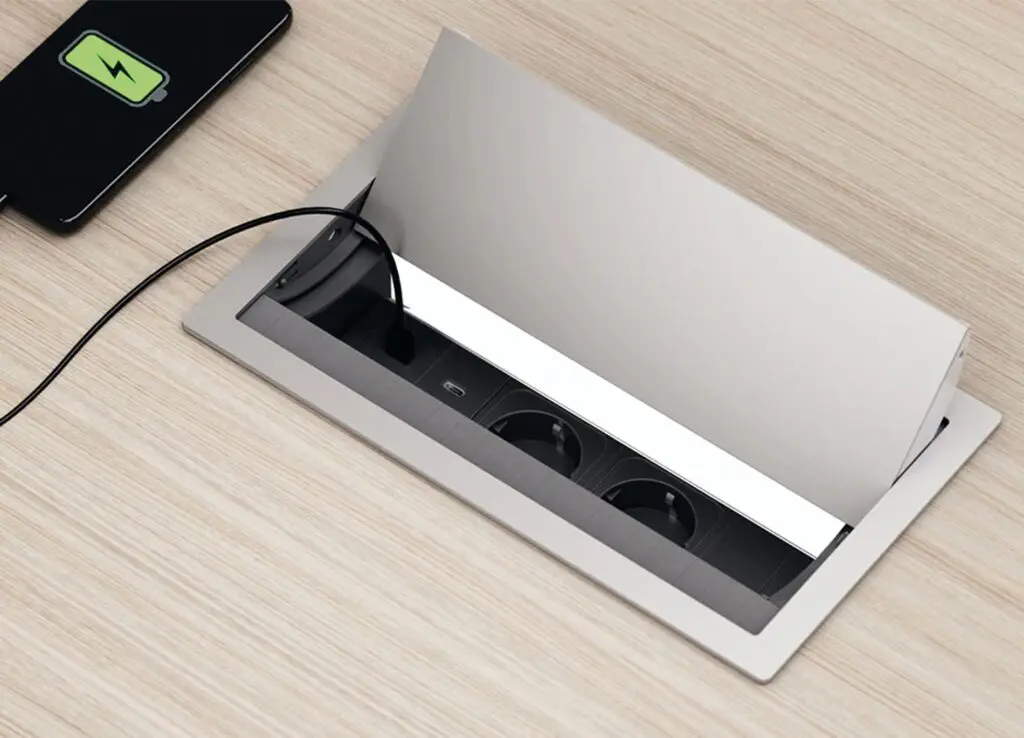
Electrification solves a concrete problem: the computer, screen, lamp, telephone and USB accessories multiply on a standard workstation.
Without accessible outlets, you're dealing with visible extension cords, trailing cables, and tripping hazards.
Electrification allows for cable management, reduces dust, and improves the overall aesthetics. It also facilitates equipment changes and renovation work.
Electrification solutions are suitable for all profiles:
- fixed or adjustable desks,
- individual workstations or meeting tables,
- small budgets or larger investments.
What are the 5 solutions for electrifying your workstation?
There are five approaches to integrating sockets and USB ports into your office: top access for quick access, shutter for economy, cutout for discretion, cable tray for organizing cables, and power blocks for flexibility.
- Top access: access via a hinged hatch
The top access panel is an opening hatch integrated into the desktop that allows direct access to power outlets without altering the appearance of the closed workstation. This solution is ideal for multi-device workstations where you frequently change connections or make quick setups.
Top access works with a suspended power strip (standard outlet + USB) or with an electrically powered cable tray. Installation requires a moderate investment, but it offers the most convenient daily user experience for those who frequently plug and unplug their devices.
- The shutter: the simple and economical solution
The shutter is the least expensive entry point for electrification. The playfield has a standard hole (80 mm diameter) fitted with a plastic cover. You can keep this cover or replace it with an electrified shutter that accommodates electrical sockets.
This option is suitable for basic workstations with a desktop PC and monitor. It requires no structural modifications and allows you to keep your budget under control.
- The notch: for discreet integration
The cutout is a recess on the back of the desktop that allows electrical cables to pass discreetly through. It requires careful installation since it is fixed, but it blends perfectly with complete setups (monitor arms, computer equipment, cable dividers).
If aesthetics are the priority and the equipment will not change, this solution offers the best visual result.
- Cable trays: organizing and channeling cables
Horizontal or vertical cable trays organize all cables under the desk. They allow for the routing and management of electrical cables while also housing power outlets. Single trays are suitable for individual workstations. Central double trays meet the needs of meeting tables and collaborative spaces with multiple users.
The installation is direct to all types of offices and it efficiently channels large cable flows.
- Electrical blocks: flexibility and multiple connections
Power supply units are modules equipped with standard (PC) sockets and USB ports that can be positioned on or under the worktop. Several versions are available to suit your needs: recessed into the worktop, integrated under a top access panel via clips, portable without drilling, or integrated into drawers (Optimax Evo unit).
Up to three units can be daisy-chained together via GST sockets, thus multiplying the number of access points. For meeting tables, specific units include RJ45 and HDMI options.
How to choose the right solution for your office?
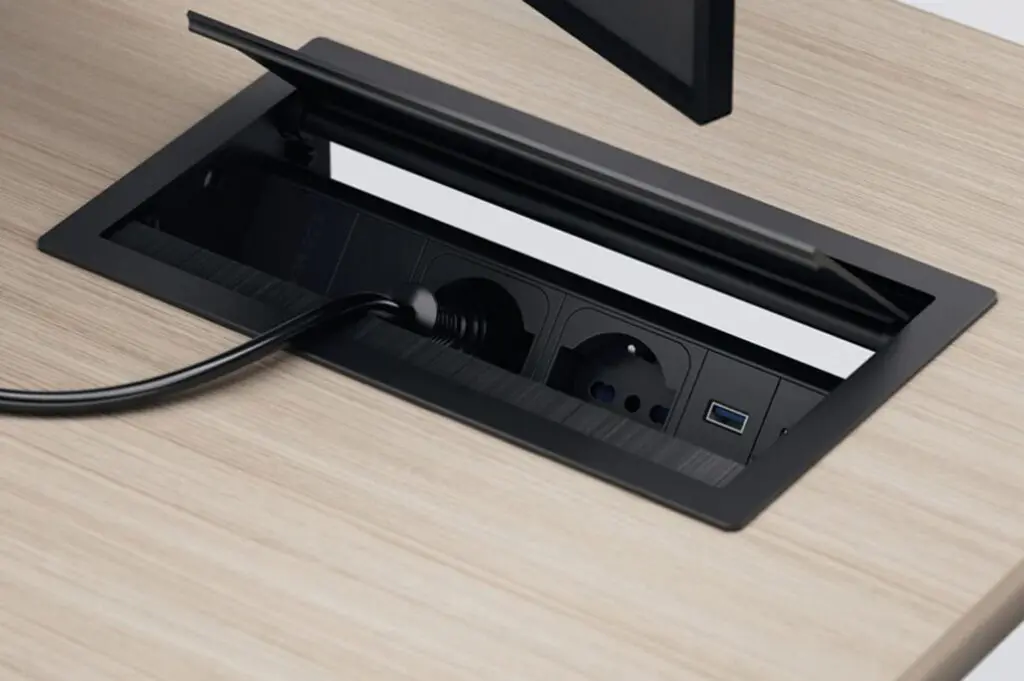
Assess your connection needs
Start by counting your devices: desktop computer, monitor, lamp, phone, chargers, USB accessories. A workstation with a desktop PC + monitor + lamp can be fitted with a shutter. A workstation with two monitors, an articulating arm, a printer, and several accessories requires a top access panel or a cable tray with multiple blocks.
Also note the frequency of connection: if you regularly move your cables or test new devices, opt for a quick access solution at the top of the shelf.
Consider the installation and the budget
The shutter is the least expensive option. The cutout and chute require a mid-range investment. The top access is more expensive but offers the best user experience. Budget often determines the initial choice, but you can also combine solutions for greater convenience.
Combining multiple solutions for greater flexibility
A meeting table can combine a central cable tray, meeting blocks, and side cable clips to organize connections for multiple people. A fixed individual desk can have a permanent cutout complemented by an articulated cable drop. An adjustable workstation features a vertical cable tray to accommodate the tabletop's movement and a magnetic cable drop with links that automatically extends.
Manage cables efficiently
Cable management systems for adjustable desks
If your desk moves up and down, the cables must follow the movement without creating tension. Magnetic cable management systems with links extend and retract automatically. Single-user and multi-user versions are available. You can also find extendable cable management systems and straight magnetic metal models for fixed desks.
For compatible adjustable desks (Astrolite, Partage, Cohésion, Astro ranges), the articulated polyester drop cables with zip also offer flexible cable management during motorized movement.
Cable clips and cable trays
Cable clips keep your wires within easy reach and prevent them from dangling or getting tangled. Installation is quick and easy using wood screws under the tabletop. The link cable trays, combined with the metal profile, channel cables along the floor, ensuring safe passage and a clean, aesthetically pleasing continuity in the workspace.
FAQs
Can I add USB ports to my existing desk?
Yes, several options do not require major modification: a portable block without drilling fixed by clamps, an electric block for Top Access hatch, or the replacement of the shutter with an electrified block if the standard drilling already exists.
Which solution works with meeting tables?
Buronomic meeting tables offer dedicated power strips with standard and USB outlets, available with optional RJ45 or HDMI ports. Central double cable trays efficiently group connections for multiple users.
Can USB ports and electrical outlets coexist?
Yes, all power strips combine standard (PC) sockets and USB ports. Power strips for Top Access, recessed units, and portable units all offer this dual functionality.
How to discreetly run cables under a tabletop?
The rear cutout is the most discreet solution for a fixed installation. For added flexibility, a horizontal or vertical cable management system gathers and completely conceals the cables under the tabletop or along the base without any structural modifications.
Do I need to modify my office to install electricity?
Not necessarily. The portable units attach without drilling using clamps, requiring no additional work. The cover replaces an existing hole. Only the top access panel or the cutout requires custom design. You can add a cable management system to an existing desk in minutes.
What types of cables can be run through a cable tray?
A cable tray allows for the routing of all electrical cables, data tray cables (Ethernet, USB, HDMI), and standard connection cables. It efficiently groups all connections while maintaining a clear organization.